

Mark II bookmark review: I paid $159 to be Mark’s QA department
In which I spend a week as Mark’s unpaid QA department and find that the promise of the bookmark is real. The company behind it just isn’t ready to keep it.
In this issue
In this issue
In October, I wrote about the frustrating customer experience I’d had with the Mark II bookmark, which I’d pre-ordered back in July.
This week, I finally received my Mark II, and after about a week of both normal and heavy use, I’ve come to a sad conclusion: the promise of the bookmark is real. Mark as a company is too immature to deliver on that promise, and that immaturity degrades the bookmark even when it’s working as intended.
It’s clearly not a lack of ability; the product itself shows great ingenuity, and the work they put into things like its physical design and its scanning hardware is obvious. But that’s kind of the problem: those are the flashy parts of building a product and a company, and while I would never argue they’re easy to accomplish, I would argue that they are the more interesting parts of the process.
The problem is Mark’s lack of investment in the unglamorous bits: documentation, quality assurance and testing, library management and organization, data integrity, and robust integrations. These are the boring things that nonetheless make or break a product, and they’re all deficient in the Mark II, in degrees that range from irritating to deal-breaking.
Compounding this is the company’s public speech. In my rant about how the company was neglecting the CX of the Mark II, I noted Mark’s poor communication around production and shipping delays, most of which was centered on Twitter. When they announced (again, on Twitter) that production had resumed, they did so with a video that, among other things, sarcastically apologized to “anyone who bought a Mark from us and expected a sub-par experience.”
That kind of smug disdain for the norms of business and customer communication — displayed before most paying customers even had a bookmark to experience — creates an air of hubris around the company and the Mark II as a product that, mixed with the unrealized potential of the bookmark and the app, makes it hard for me to recommend.
I’ll dig into the nitty-gritty of why in the rest of this review, but the tl;dr is that, unless or until the company matures enough to fully address these problems rather than just massage the reality around them, I don’t think most people should buy the Mark II.
What it is
The Mark II is a highlighter-shaped scanner that magnetically attaches to a metal bookmark.
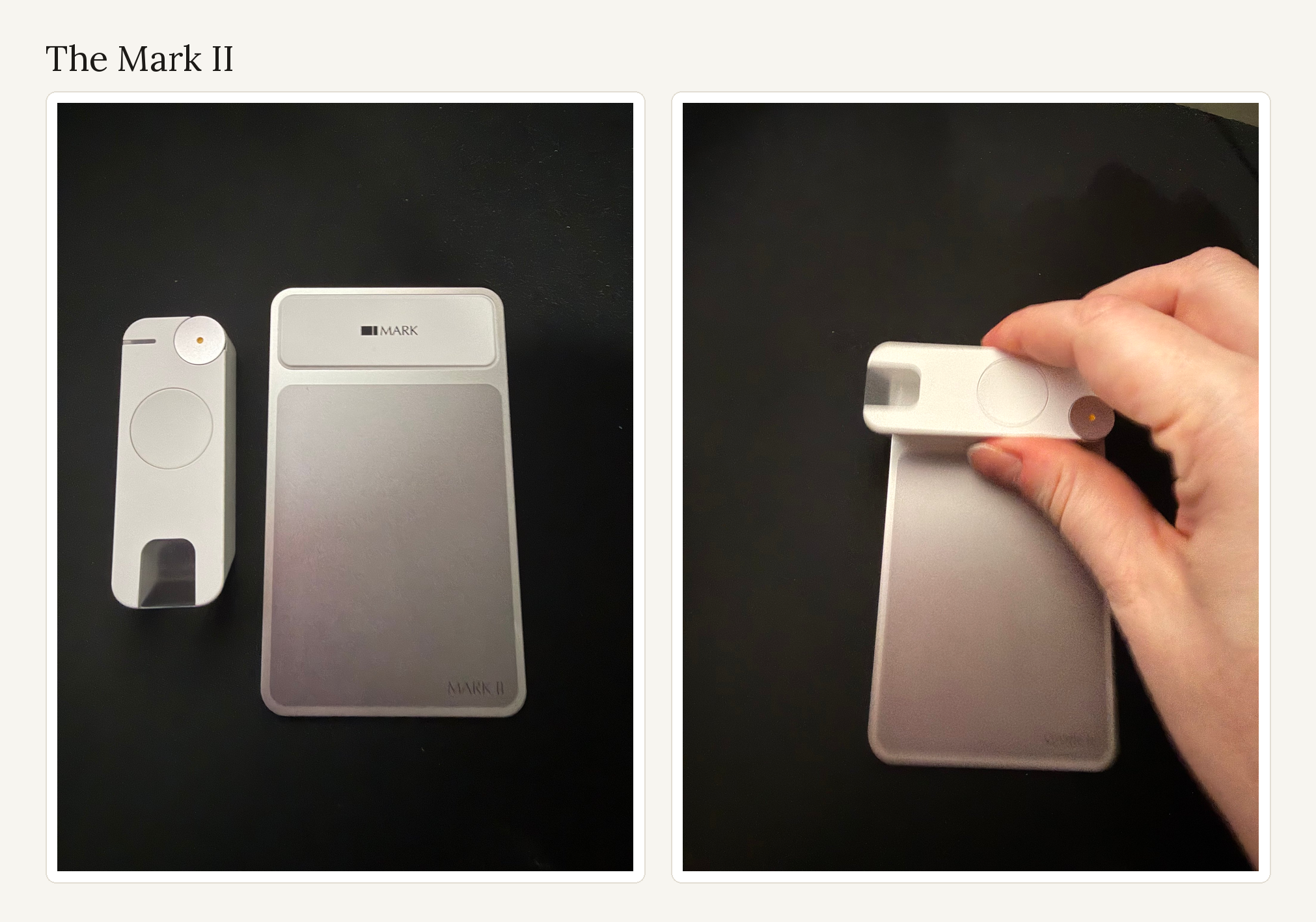
For clarity, when I refer to the Mark II or the bookmark, I mean the scanner. When I say just Mark, I mean the company.
Mark the company describes the Mark II smart bookmark as a “reading companion that helps you capture, organize, and revisit what you read, without breaking your flow. You can highlight, speak, or capture ideas in the moment, and they’re instantly structured into a system to search, revisit, and build off from.”
Specifically, the company claims the Mark II:
- Scans handwriting and text from physical books, e-ink and glass screens like iPhones and tablets, research papers, and print-outs in more than 100 languages
- Uses an unnamed state-of-the-art AI model to extract text, which auto-completes scanned text “to make sure every scan is the closest to the original”
- Builds your knowledge system automatically
- Allows you to “find ideas later by topic, theme, or moment”
- Automatically links quotes to books added via the ISBN scanner
- Syncs to Notion, Obsidian, and Readwise
- Allows you to scan page numbers to add to a quote for easy attribution
The Mark II is genuinely skilled at reading handwriting, and the ISBN scanner identifies books reliably. Its accuracy on everything else — physical books, e-ink, glass — and its execution of the rest of that list are…let’s say fuzzy.
Who I am and how I tested
I’m a customer experience expert who’s worked in Tech (software, not hardware) for over 12 years. Because I’ve done this work for so long, I’ve done (or directed the work of folks who’ve done) almost all of the things I criticize Mark for not doing: customer relationship management and communication, documentation, information management and organization, and software QA testing. And although I haven’t built data integrity solutions and integrations myself, I’ve worked very closely with engineers who have in order to support our customers.
Having said that, I’m not a professional tech reviewer. A seasoned reviewer might have tested things I didn’t think to test, or gone about testing a different way. I’m just a person who wants a thing I bought to work, but my insight as a CX professional lends depth to my review that a typical consumer or tech reviewer might not have.
I received my Mark II on Nov. 10, and used it for two days before I shared my first thoughts on Bluesky on Nov. 12. My read of the company was right, but two of my assertions from that thread were wrong and I’ll correct them in this review: that the tutorial doesn’t cover multi-line scanning, and that the company didn’t communicate the issues I ran into. A third — that the Mark II doesn’t work properly for left-handers — I talked myself out of after a small test, then tested it properly and found it was right after all.
I’ve been using the bookmark continuously since it arrived, for a testing time of roughly six days. I tested it during what the company would probably consider typical use, which is reading a book for an hour here and there and scanning as I read, but also during very heavy use, which is scanning text from a book I’d already read, highlighted, and annotated on and off for three to four hours. In both cases, I started with a fully charged battery, although only during the heavy use session did I use the bookmark until its battery was fully drained.
I used the bookmark in both left- and right-handed mode to scan text and handwriting from two printed books, a third book read on my Supernote A5 X and my iPhone, and a handwritten notebook.
I also ran controlled accuracy tests, separate from normal reading. I captured the source first — photographing the printed pages, screenshotting the screens — then scanned the same sentence over and over and checked every capture against the source word by word. Thirty-five captures in all: 15 from print, 10 from my Supernote’s e-ink screen, and 10 from my iPhone, with the screen runs split evenly between right- and left-handed mode.
Because my initial setup session resulted in a lot of mis-scanned quotes, I deleted all of those first quotes on the 10th, of which there were about 50, and started over fresh from there. As of writing this review, there are 123 notes in the Mark app, the majority of which are scanned quotes with some voice or manual notes (more on why I don’t have precise numbers for you on this later). I exported my notes from the app several times, and I created a Readwise account on Nov. 14 just to test the integration. The Mark app version is 1.1.8 (1) and the bookmark’s firmware version is 7.6.2.2.
One last caveat: I’m not interested in the “use AI to chat with your notes” feature, and I haven’t used or tested it at all.
What’s good about the Mark II
There are reasons the Mark II is so appealing as a reading and capture tool.
Perhaps the biggest reason is its design; as a device that you need to hold and be able to keep steady to scan text, it excels in comfort and practicality. My hand molds to the bookmark, so that the butt of the bookmark falls between my thumb and my pointer finger, which makes keeping the device stable on the page easier. The scan button is placed where my thumb naturally rests, so pressing and releasing the button with every line is almost effortless.
I can’t say what this experience is like for folks with larger hands or disabilities (mine are medium-sized, probably, and I have no grip or other challenges), but I was able to use the bookmark for long periods without cramping or discomfort.
I’m also not concerned that I’m going to lose the Mark II when carrying it from place to place in a book; its magnetic hold to the metal bookmark is quite strong, and only extremely aggressive and intentional waving dislodged it. Even then, the bookmark appears to be pretty resilient; I’ve dropped it a few times by accident with no effect on its function (although I obviously don’t recommend testing this).
It’s neat that it works on screens at all, which not every scanner does: I captured from my Supernote A5 X and my iPhone without photographing a display or retyping anything. There are problems with accuracy in scanned text from screens, but that’s true for books as well, which I’ll get into below.
Your mileage will probably vary on scanning stability on different surfaces; the bookmark can stick a little on coated e-ink screens and slide a little too easily on glass screens, but I was able to compensate by adjusting the pressure I used during scanning, so it’s very manageable and likely a user-specific issue.
Its handwriting recognition is impressive, especially considering my handwriting is often closer to chicken scratch than it is to actual writing. I’ve found its handwriting-to-text conversion on par with that of my reMarkable 2, a capability with which I’m more than happy.
Surprisingly, my favorite feature of the Mark II is its voice notes. I often find myself reflecting on passages or thinking through what I might write in response, and having to stop and write down those thoughts is a major disruption to my workflow. Something always seems to be lost because either I’ll wait until I’m done reading or I’m unable to capture the full context of my thoughts when I context switch.
Being able to record my thoughts in place and have them show up accurately in the same place as the text I’ve been saving has been a gamechanger. In fact, I probably wouldn’t have been able to write this review of the Mark II without the Mark II and its voice notes feature. The irony cuts both ways, though: voice notes are also where the app failed me most badly — more on that later.
What the Mark II and its app get wrong
To make this review most useful, I’m going to start with the most severe problems and work my way down to the least severe. This means I have to start with scanning accuracy.
The bookmark scans text, then something changes it
Again, that the Mark II works on both printed material and screens is ingenious, and not in question here. But the Mark II and its app only fulfill their promise if the user can trust that the text they’re saving is being recorded exactly as it appears in the source.
After both regular and targeted testing, I found that scanning was inaccurate enough that I could not just scan and move on confidently, a problem that was notably worse in left-handed mode than it was in right-handed mode.
I’m left-handed. Because neither the in-app tutorial nor any resources available on the company’s website mention anything about a left-handed mode, I initially thought it didn’t exist, and said so in my Bluesky thread. I’d tried scanning text from left to right in a book, with these results:
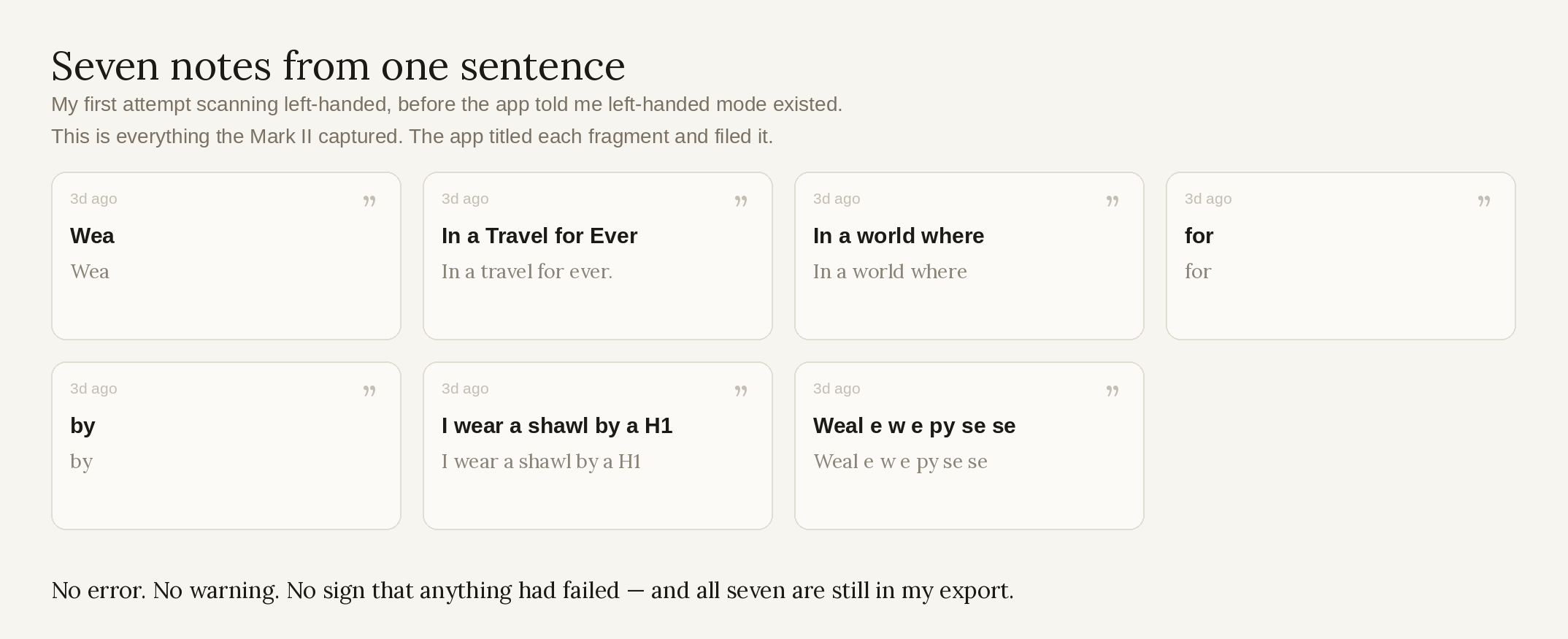
A couple of hours after I posted on Bluesky, I received an email explaining how to use the bookmark with my left hand (scan from right to left) — which is the second thing I got wrong in that thread. I’d said that Mark didn’t communicate the issues I ran into. They did — just late. So I tried again, with better results.
At first I thought I was totally wrong and that left-handed mode worked at the same level that right-handed mode did, until I decided to test this systematically. I scanned a physical book, my Supernote A5 X, and my iPhone. For each, I scanned a single passage five times with my right hand and five with my left.
What I found was that left-handed mode showed errors far more often than right-handed mode did, especially on e-ink and glass screens:
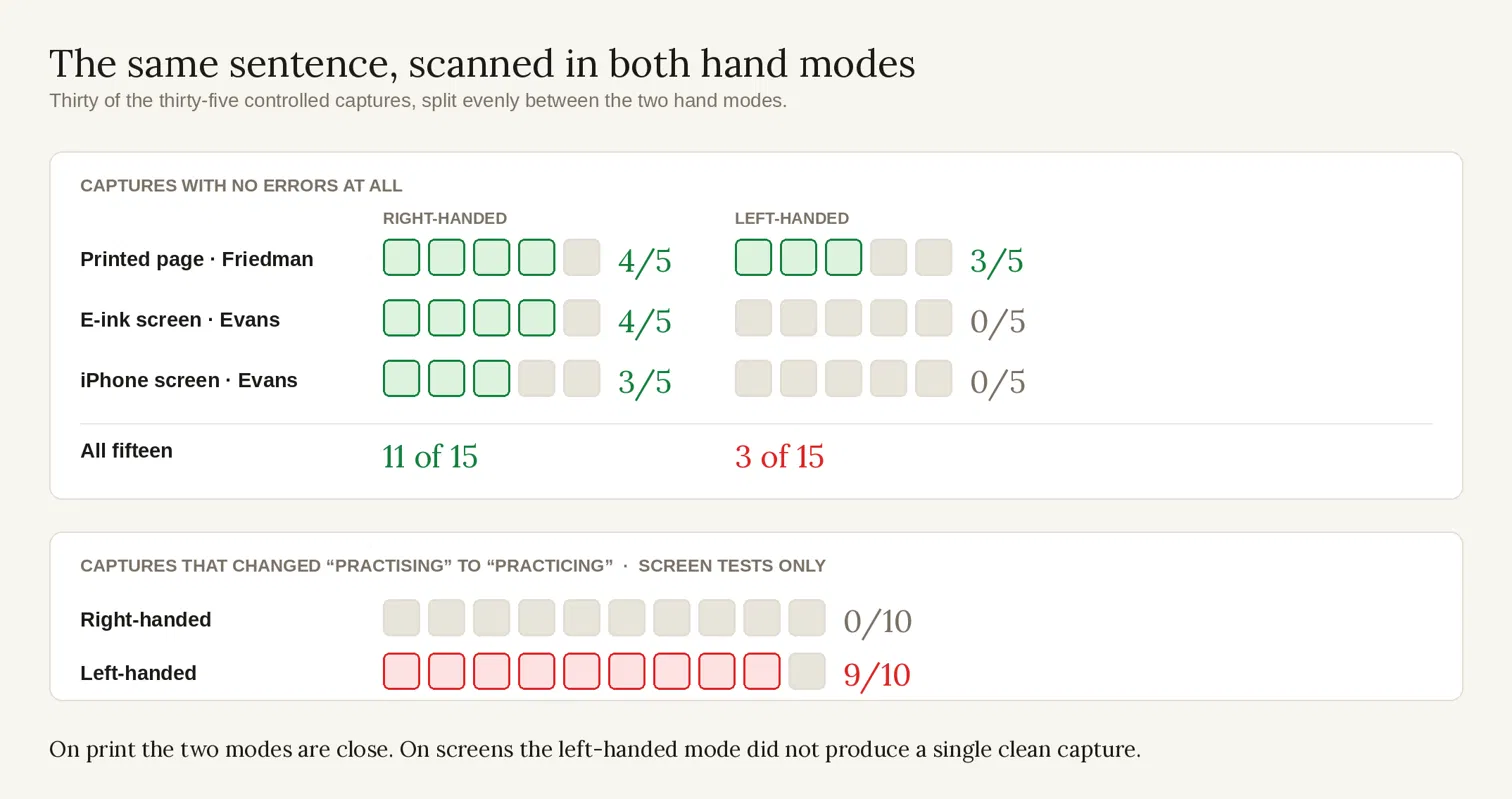
But there were errors even in right-handed mode, and the types of errors matter.
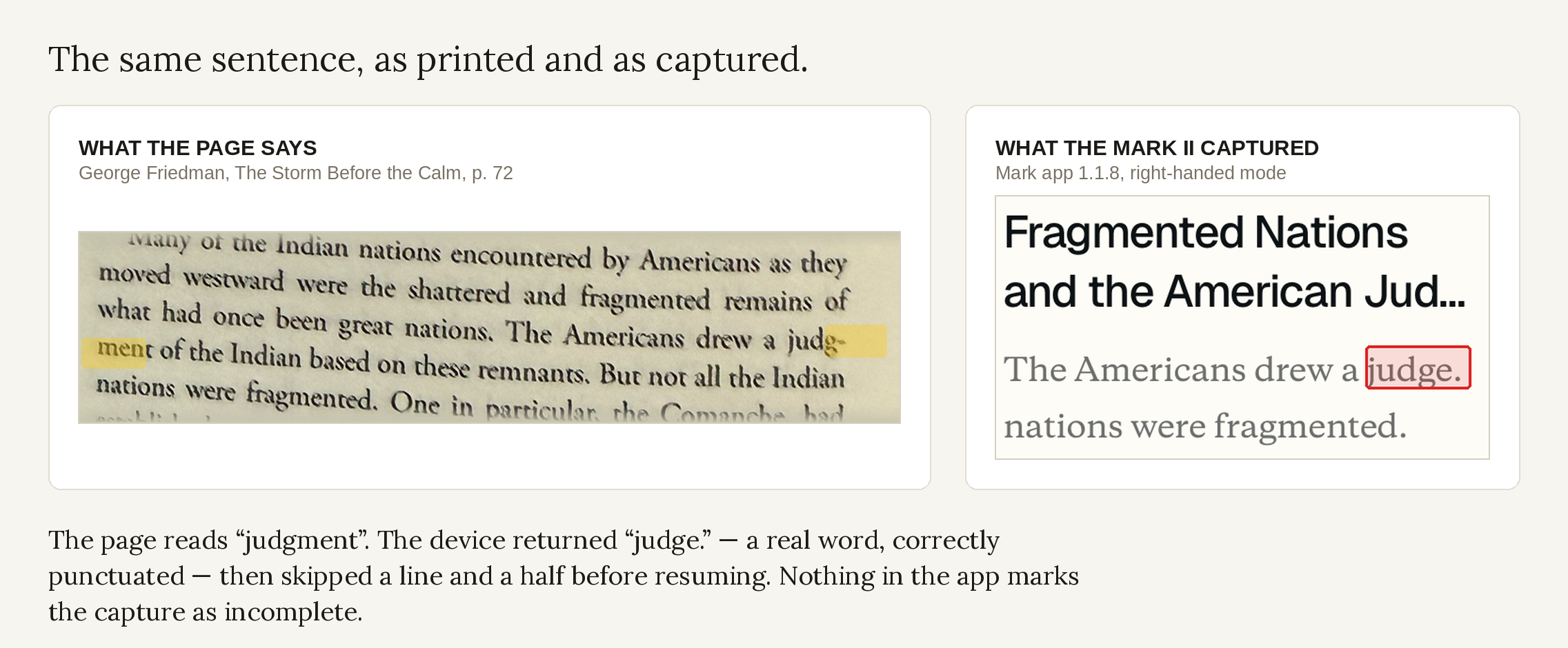
The Mark app showed instances where hyphenated words were truncated and then completed as something else (judg-ment to judge), tenses of words were changed (lived to live), British spellings of words were Americanized (practising to practicing), and perhaps the most egregious error, whole words were changed (continental to cultural, constituting to contributing):
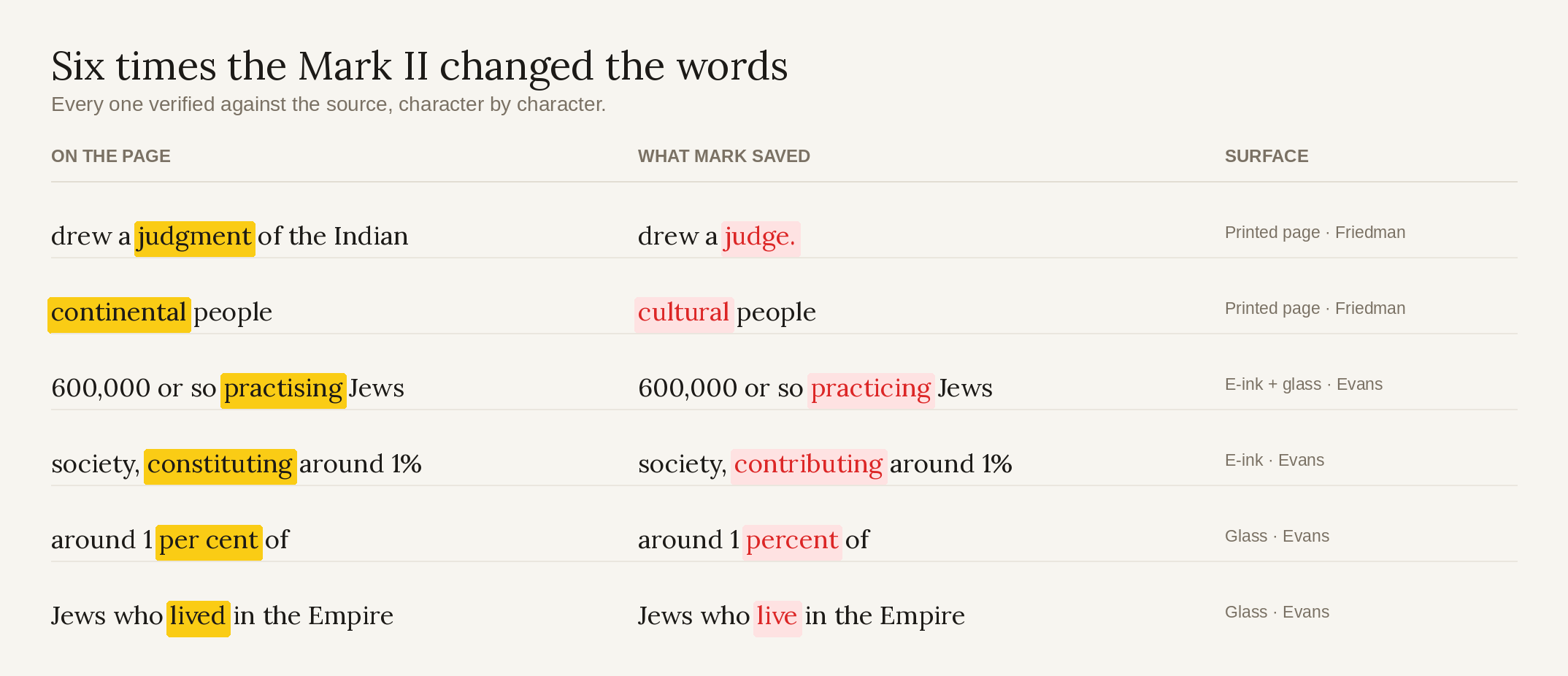
If, like me, you are using the Mark II to conduct research to use in later writing, these errors are particularly troublesome, because if you just scanned a quote and moved on to the next one, you might not realize that anything was amiss.
Mark’s own FAQ says the device “uses AI to auto complete any missing letters or words to make sure every scan is the closest to the original,” so we know that the app can guess at or auto-complete a word using AI. What you’re not told is which of your quotes it touched — there’s no flag or notice that the app has intervened in a capture.
Currently, I don’t feel comfortable enough with scanning accuracy (either in left- or right-handed mode) to scan a passage without having the app open and checking the saved results manually, which also means using the Mark II in offline mode is automatically a no-go for me.
This is at odds with Mark’s claim that the bookmark “helps you capture, organize, and revisit what you read, without breaking your flow.”
The app’s note organization is dysfunctional
These are failures of the app, not the bookmark itself. But because the bookmark is useless without the app, these failures are pretty glaring and have a huge impact on the overall experience of using the Mark II.
1. Book linking breaks after more than one book
For starters, once you add more than one book to the app, it will eventually get confused about where quotes go.
Quotes always landed appropriately when I was just scanning text from one book, but once I added a second and started switching between them, quotes often ended up not linked to a book at all.
This happened even when I had the correct book open while scanning, and I had to go find the quotes and individually link each one to a book. This is especially tedious because bulk note management doesn’t seem to exist in the app at the moment. Again, this contradicts Mark’s claim that you can “simply use your phone to scan the book’s ISBN…[f]rom there, everything you capture is automatically linked to that specific book.”
Even when quotes are correctly linked to a book, book covers appear inconsistently on quotes — sometimes there, sometimes not, with no pattern I could work out.
Also, once you link a note to a book, it can’t be unlinked. You can only update the link to another book, so if you have a note that instead needs to remain unlinked, it will stay under the incorrect book indefinitely.
2. Tagging is delayed, inconsistent, uncustomizable, and overwhelming
The most irritating thing with the app (to me) is how tagging works.
Other than books, the main way the app organizes your quotes and notes in your library is through tagging. But you can’t create your own tags; you are forced to rely on what the AI suggests for tags based off the passage you scanned, and — to be frank — the AI suggestions suck.
The app’s AI is not good at identifying themes in a quote; I can’t say for sure, but it seems to rely on keywords in the note, and when there aren’t any distinct keywords, its suggestions are few and limited.
I suppose a workaround to this could be creating a collection (the app allows you to add these manually) and then sifting through all of your notes to add the tag for that collection, but again, you’d have to do this note by note, for each additional collection. Who the hell wants to do that? Not me.
More annoyingly, tags often don’t even appear until you’ve moved on to the next scanned quote. I very frequently find that tags for a prior note are being suggested in a newer note, and that I have to go back to the prior note and add those new tags manually.
And the AI suggests all existing tags on every note, not just the ones that apply to the specific one you’re looking at. That means that, once you’ve built up a decent library, you’re being served a wall of tags to pick through, which is just another tedious, manual thing the app forces you to do.
3. Voice notes can randomly end up as comments on other voice notes
I’m a heavy user of the voice notes feature, so you can imagine my confusion when 14 of my voice notes ended up as comments on other voice notes for no clear reason.
I’d record a voice note, see it appear briefly on the Notes page, then disappear seconds later with no breadcrumbs to where they ended up. After a lot of troubleshooting (and opening every single note I’d created at that point), I discovered that the vanishing voice notes hadn’t vanished at all, but had somehow been converted to comments on other random voice notes.
Thankfully, it was possible to convert them back into notes, but that required pressing and holding every voice comment, converting it to a regular note, and then (for most) adding tags to each note manually.
It turns out that this issue played a big part in data integrity issues elsewhere in the app and exporting, but I’ll cover that in more detail in another section.
4. Filtering your library is unnecessarily difficult
There is a search function in the app, and notes can be sorted by book or collection elsewhere, but those options really require that you know what you’re looking for.
I actually think it makes sense to default to a browse mode on the Notes home page (even when that gets a little unwieldy once you have tens or hundreds of notes), but I don’t understand why the only sort options on that page are “Sort by last captured” and “Sort by last edited.”
The app also doesn’t seem to have a way to easily distinguish between scanned text, voice notes, and manually-typed notes, which means you can’t filter the Notes page by note type or even use the search function to find a certain type of note.
Export is not what we were sold
Mark’s website makes a few claims around preserving your workflow and getting your notes out of the app in a usable way:
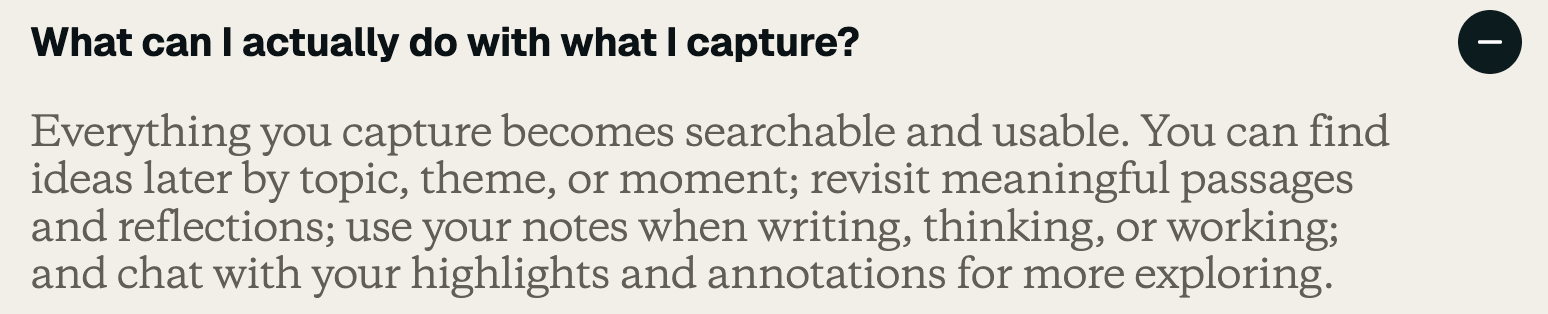
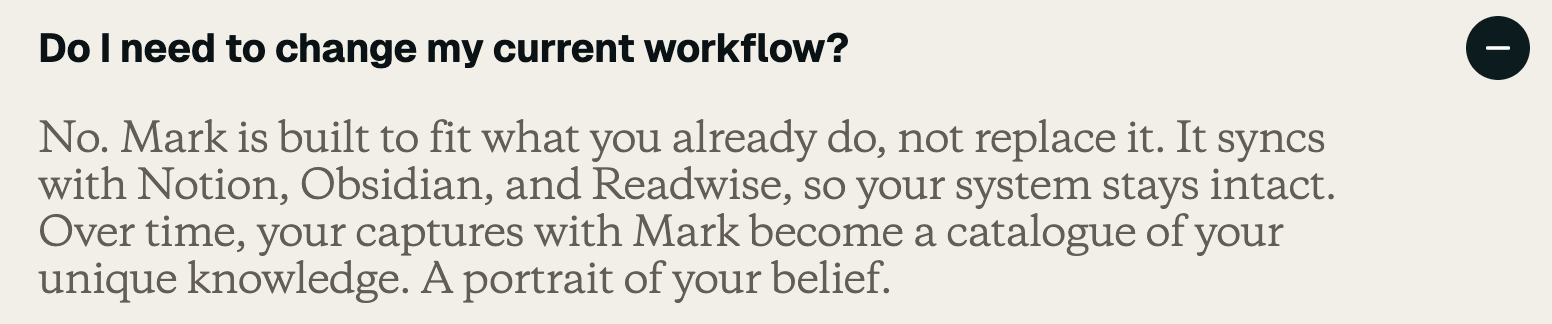

First, nowhere in the tutorial, in subsequent emails, or on the Mark website are there instructions for how to export your notes. I found red herrings in the app that turned out to be options for sharing graphics of my quotes and — for some reason — my app profile (and I’ll definitely be talking about the implications of it being easier to socially share stuff than it is to actually use my notes elsewhere), but finding export required some digging.
I literally had to just systematically open every menu or modal I could find; I finally discovered it in my profile, under “Data management.”
Here is the starkest difference between what Mark claims and what’s true: As of writing (Nov. 15), there are only two ways to get your notes out of the Mark app, and both are flawed: via CSV export and Readwise. Blatantly missing are Notion and Obsidian, as well as “plenty of app integrations to make using Mark familiar.”
CSV export doesn’t include important info the app already has
Let’s start with the export to CSV. Reasonable people can certainly disagree on what “usable” means, but if Mark is making promises that my existing workflow stays intact with the Mark II and app, then I think it’s fair to assume that means all the pieces of information that make research usable:
- the source title,
- the source author,
- the note itself,
- source page number (if present),
- the note’s tags,
- the note’s title (if present),
- the note’s type,
- any identifier that makes reconciling the exported note with its counterpart in the app possible, and
- both the time the note was created and last edited (if applicable).
Despite the app already having all of that information, the CSV export only includes five of these: the source title, author, the note text, source page number (if present), and create time.
Even worse, comments on notes — for example, annotations or arguments on a specific passage — aren’t exported at all, and you don’t find this out until you try to export your notes, presumably after you’ve already used the comments feature.
That omission is worse than it sounds, because of the voice note problem I described earlier. Fourteen of my notes had been turned into comments on other notes without my doing anything. Comments don’t export — so those 14 notes didn’t export either. But the app still counted the comments as notes.
To break it down: the app said I had 123 notes in my library, which was correct if you counted the comments (which I couldn’t yet, because I didn’t know that’s what they were). But when I exported, the CSV only had 109 rows (because comments aren’t exported). There was no way for me to reconcile this discrepancy systematically, because there’s no way to distinguish between note types in the app.
As a consequence, I spent 20 minutes opening random notes, seeing that some voice notes had comments, then opening every voice note to see if it had comments, and then converting each comment back into a note. That led me to a hunch that exports didn’t include comments, so I exported again: 123 rows.
It’s not just that there’s no information on how export should work, or that library organization and export are separately dysfunctional, it’s that their dysfunctions interact in a way that causes maximum confusion and irritation.
Readwise is undercooked
The Readwise integration is incomplete in different ways. To begin, you are given only three settings: the option to import from Readwise, the option to export to Readwise, and the option to disconnect from Readwise.
There’s no way to see the status of a sync in either direction, which matters because the sync is slow and the delay is wildly unpredictable. One batch took about 12 minutes to show up in Readwise. A later change took hours.
Nothing in either app tells you a sync is running, how far along it is, or whether it has finished. If you don’t know that — and you wouldn’t, because there’s no documentation for this integration anywhere — it’s easy to conclude that notes have been dropped when they’re just still in transit. It’s just as easy to conclude they’ve arrived safely when they haven’t.
Once notes are in Readwise, changes you make in the Mark app don’t follow them. The quotes that hadn’t linked to a book correctly landed in a generic “Mark Notes” collection in Readwise. I then linked all 18 of them to the right book in the Mark app. The app showed 21 notes under that book. The CSV export showed 21. Readwise still showed 3 — the other 18 sitting exactly where they first landed, in “Mark Notes.”
They’re still there. Readwise has since caught up on everything else: the note count now matches the app exactly, so the connection works and the sync has finished. It simply never moved them. Whatever Readwise receives the first time is what Readwise keeps.
Corrections don’t seem to move over either, and neither do tags. To be fair, it’s hard to say for certain — with no sync status and a delay that ranges from minutes to hours, there’s no reliable way to tell “this didn’t sync” from “this hasn’t synced yet.” Which is its own problem. Either way, you have to spend time in Readwise redoing work you’ve already done in the Mark app.
If you, like me, are using the bookmark to capture many notes, then the ability to organize and find the information you need later is vital. That we can use what we’ve saved is a core promise made by Mark, and — as export currently stands — they are failing to keep it.
Things that are annoying but not dealbreakers
Unlike the above, there are a lot of relatively little things that definitely affected my experience with the Mark II but that aren’t disqualifying on their own.
Setting up and figuring out how to use the bookmark took 42 minutes, from pairing it to really understanding how to use it (with my right hand, since at the time I had received no instruction for how to use it with my left hand).
I had originally said on Bluesky that the tutorial didn’t cover scanning multiple lines; it does in fact cover that and I misinterpreted it.
In my defense, though, the clearest instruction I received on this came in a pop-up that only arrived after I updated the firmware:
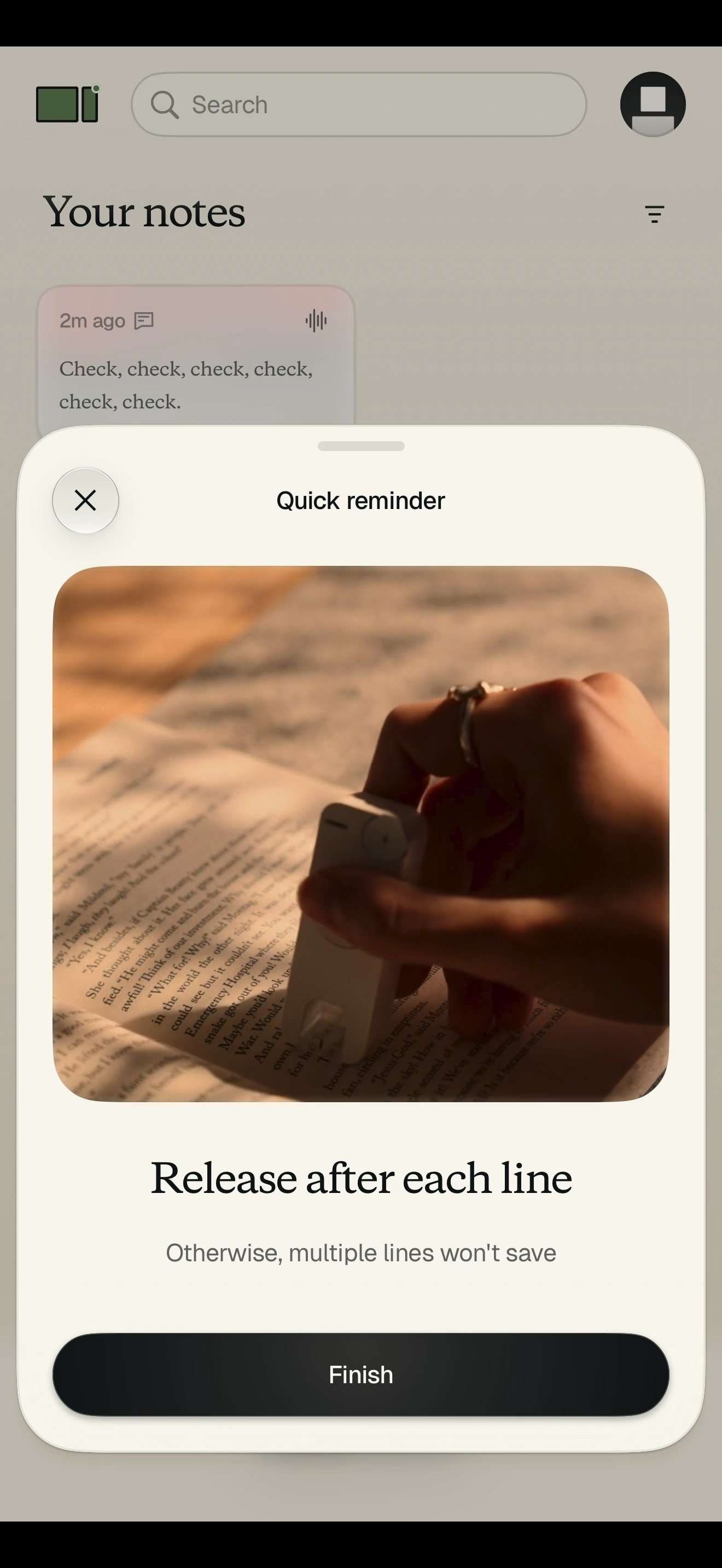
The firmware update itself only appeared after the bookmark stopped working entirely, 12 minutes into setup, with no error and no explanation. I had no way to tell whether I’d broken it, whether it was defective, or whether I was still doing something wrong.
By the time I was prompted to update the Mark II’s firmware, I’d settled on defective. You can imagine my relief at finding out I hadn’t just bought a weird-looking paperweight.
This experience was repeated later: twice in my first hour of regular use the Mark II simply refused to scan mid-passage, the second time within 10 pages of the first, and I had to reset it with the dongle that came in the box. Since there was a way to fix it, I’m filing it as irritating rather than dealbreaking, but it is a bigger deal than it appears, and I’ll come back to why later.
Scanning page numbers doesn’t work for me either. The company lists it as a feature — capture the page number after the quote and it gets attached for attribution — and I scanned them as instructed. It took maybe one time in ten, and after trying a bunch of ways to scan (both left- and right-handed), I can't figure out what makes it work and what doesn't.
Then there’s the battery. I started my heavy use test with a full battery, and scanned a book that I had already highlighted and annotated on and off for three to four hours. I wasn’t scanning that whole time, but there were definitely fewer breaks between scans than there would have been for a regular reading session.
The battery drained to 2% during that session, at which point it behaved exactly as the app says it will at that level (the indicator light flashes red but otherwise the Mark II shuts down). The Mark website claims the Mark II’s battery lasts “about a week per charge,” but nowhere does it say what a week of use is supposed to look like.
I can’t tell you whether that’s true, because I never used it lightly enough to find out. What I can tell you is that three or four hours of sustained scanning took it from full to dead. That’s a wide enough gap between use cases that “about a week” is not a terribly helpful figure.
Plugging in the bookmark to charge is harrowing — you have to push really hard to fully seat the charger plug into the USB-C port, and it snaps loudly every time I do so. Mark’s website also claims you can use the Mark II while it’s plugged in and charging, but practically this is impossible because the cord is way too short.
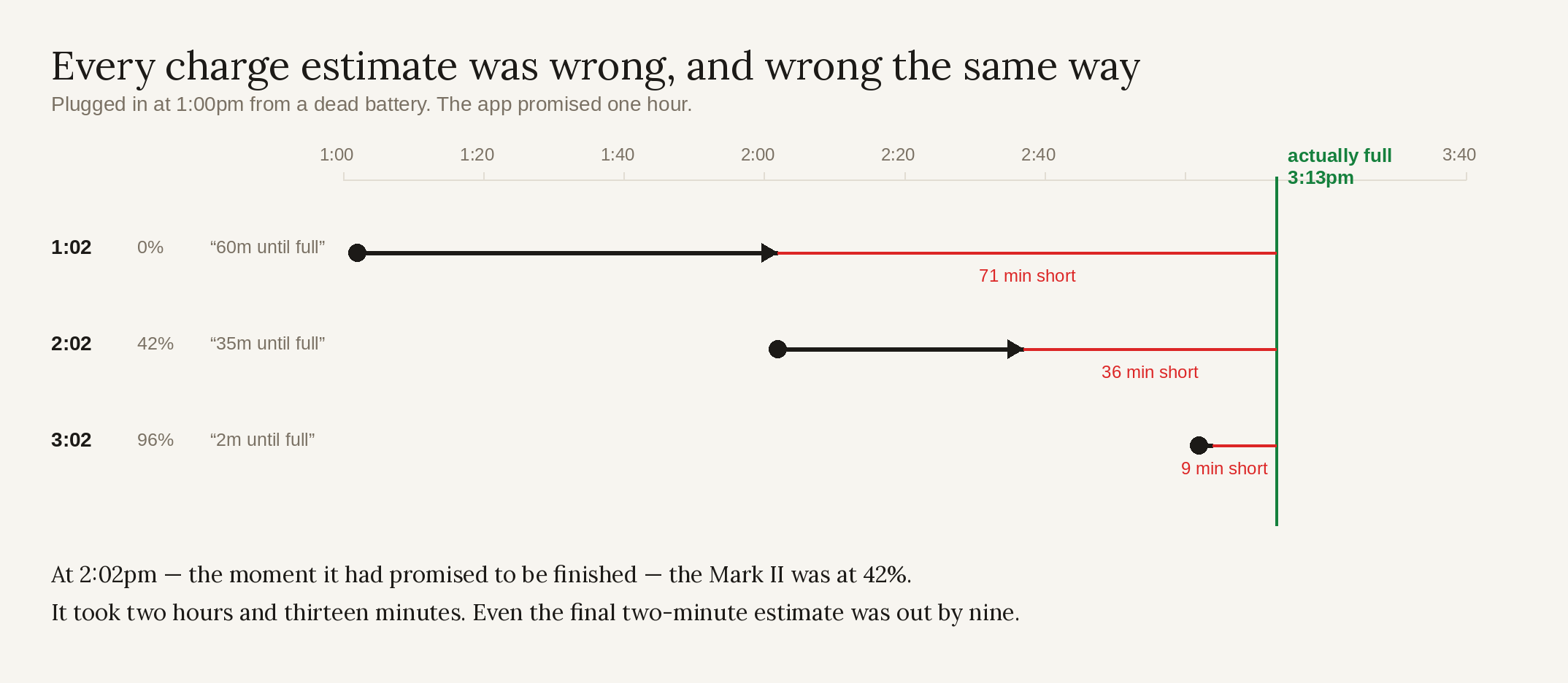
The app’s charging estimate is also wildly inaccurate; it said there was “60m until full” when I plugged it in at exactly 1 p.m. (I didn’t capture a screenshot of this screen until 1:02 p.m., so I decided to check in at :02 of every hour just to keep it sort of scientific).
When I checked again at 2:02 p.m., it was only 42% charged with an estimated “35m until full.” At 3:02 p.m., it was only 96% full with “2m until full”; it took another 11 minutes to charge to 100%.
The other thing I noticed during the heavy use test is that the bookmark gets noticeably warm after a while. Not uncomfortably so, but enough that I worry about the hardware’s longevity.
The company is the problem, not the product (even though it kind of is)
Look, the product and the app are new, I get that. Most of what I’ve covered here is explainable given the Mark II’s age and forgivable if the company did its due diligence to ship the best product it could.
In my opinion, Mark did not.
There are several reasons I think this, which I’ll cover here, but the most damning evidence for my argument is this simple, small dongle:
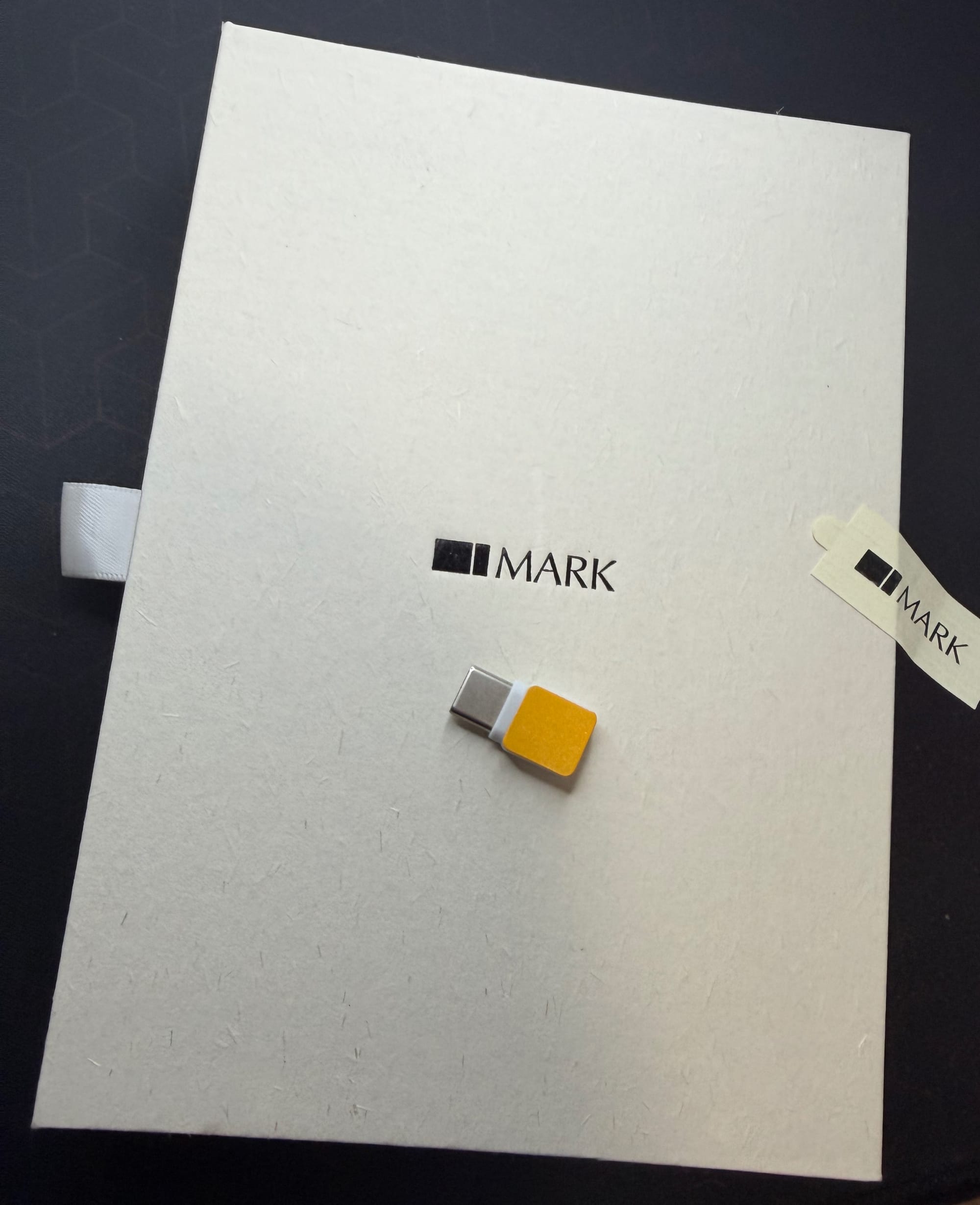
This is the dongle that I had to use to reset my Mark II twice in my first hour of regular use. This dongle should not exist.
It shouldn’t exist because if they knew well enough in advance of shipping the Mark II that it would need a dongle, if they had enough time to create the dongle, then they had enough warning that they should push shipping the Mark II until whatever caused the need for the dongle was fixed.
If that logic isn’t enough for you, let’s take a deeper look at the bookmark’s timeline:
- On Oct. 14, Mark announced that they had discovered an issue with the Mark II’s firmware and had paused production to fix it. This is good! This is what a responsible company does when it discovers a problem with its product. Unfortunately, it didn’t last.
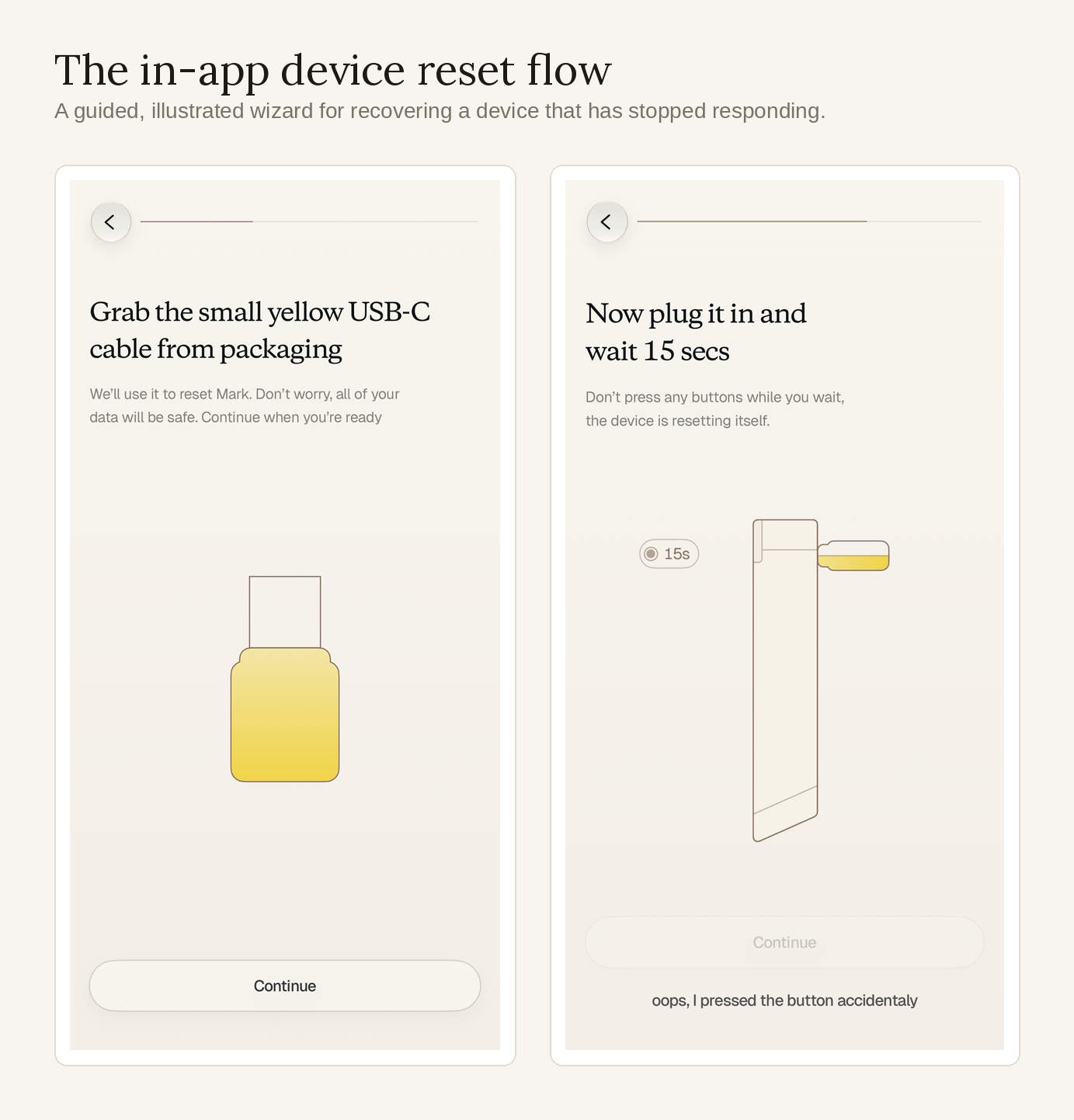
- Around Oct. 18 (the app’s version history just says four weeks ago), Mark pushed v1.1.3, which “improved onboarding…refreshed tutorial animations and clearer copy,” and added a “Device not working?” help flow. Here are a few steps from that flow to show that it definitely involves the dongle:
- On Oct. 20, Mark announced that they had resumed shipping Mark II units.
I believe that Mark shipped a product that they knew was faulty, and I believe that because they gave us the evidence along with the product. Then they published that video snidely apologizing “that we had every opportunity to build an average product, and failed. Because we’ve been hard at work at making sure Mark is an incredible experience once yours arrives.”
Side note: I had to rewatch that video just now to transcribe it, and I laughed out loud when I heard those words again in light of the above. They are…ironic, to say the least.
But hey, let’s set aside whether it should exist at all. Even on its own terms, the dongle is a bad reset mechanism. Plenty of devices need a physical reset. What’s unusual is needing a specific object to do it.
A reset pinhole takes any paperclip. Holding the power button takes nothing at all. The Mark II’s reset takes the small yellow thing that came loose in the box, with no label and no documentation — and if you’ve lost it or thrown it out because nothing told you what it was, you don’t have a reset path at all.
There’s nothing in the app that points you to the reset flow either — no prompt, no error, no notice that the device has stopped responding. The one time the app did react to a dead bookmark, it was a firmware update prompt that looked like routine housekeeping and said nothing about why it had appeared. The other two times, I found out my bookmark had stopped working because it had stopped working.
The dongle would be enough proof on its own of what I am charitably calling the company’s immaturity, but there are plenty of other examples.
Pretty much everything I covered in the review would have been caught if Mark had QA-tested the Mark II for a week before shipping it (again, I know this because I am not a QA engineer and still found all of these issues in less than a week). There are two ways to look at this:
- They didn’t sufficiently test the Mark II and instead offset that responsibility onto paying customers, or
- They did sufficiently test the Mark II, realized that fixing the issues would further delay getting the product out, and shipped it anyway.
Either option is pretty bad.
There is also the matter of documentation. The dongle arrived in the box with none. I only found out what the dongle was and where to access it from an email that came two days after I received my Mark II:
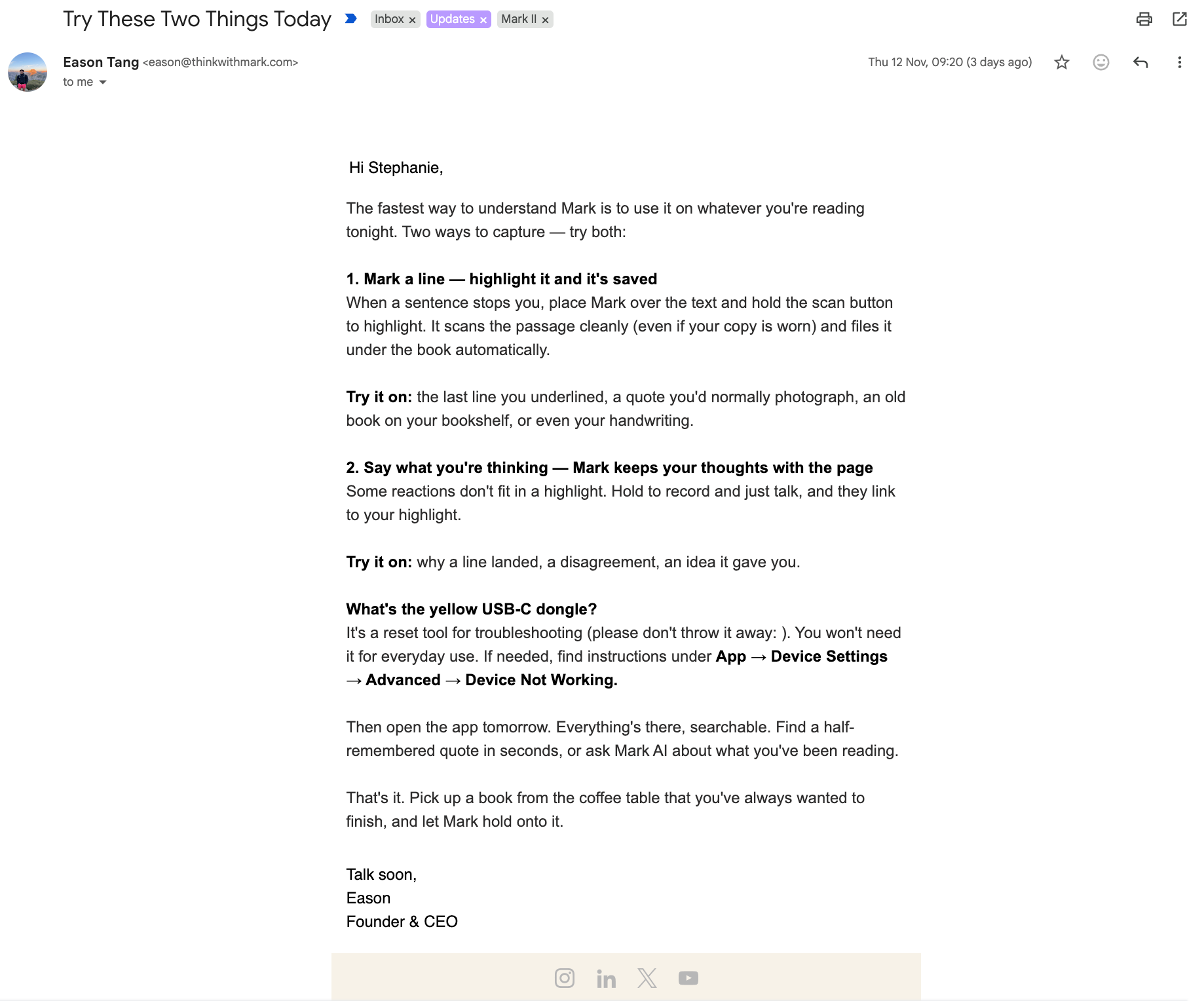
What's the yellow USB-C dongle?
It's a reset tool for troubleshooting (please don't throw it away: ). You won't need it for everyday use. If needed, find instructions under App → Device Settings → Advanced → Device Not Working.
A quick-start guide did come in the box. It says only “Hold to record” and “Hold to scan,” then points you at a QR code to “revisit and share.” Even the $20 headphones I ordered from Amazon came with more detailed instructions.
But that it’s oversimplified isn’t really the problem. The problem is that “Hold to scan” is wrong for most of what you’d want to capture — hold the button across two lines of a paragraph and the capture fails. The card needed four more words, “release after each line,” and it doesn’t have them.
The tutorial does cover it, as I said earlier, but I read that tutorial and came away with the wrong idea, which is a documentation failure of its own. The only unambiguous statement of the rule I ever got was a pop-up after the firmware update, a dozen-odd minutes into a setup that took me 42.
But perhaps what was included in the box is more illustrative of Mark’s general attitude toward their product and their business. For example, this useless black card:
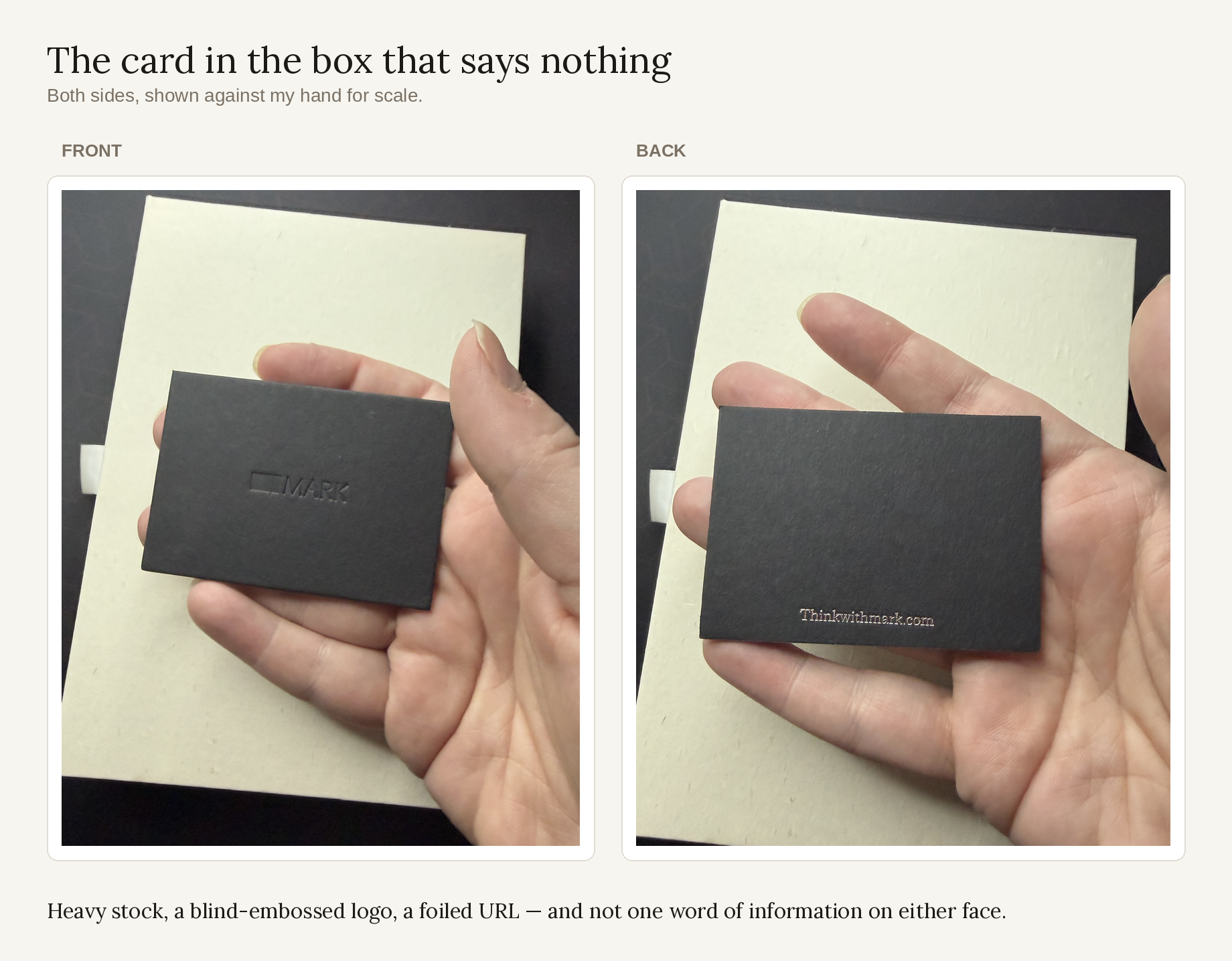
What purpose does this serve? How much did this cost? Was this so expensive that they couldn’t print a real product guide?
But the included materials get yet more absurd. Here’s the letter that was sent along with the Mark II:
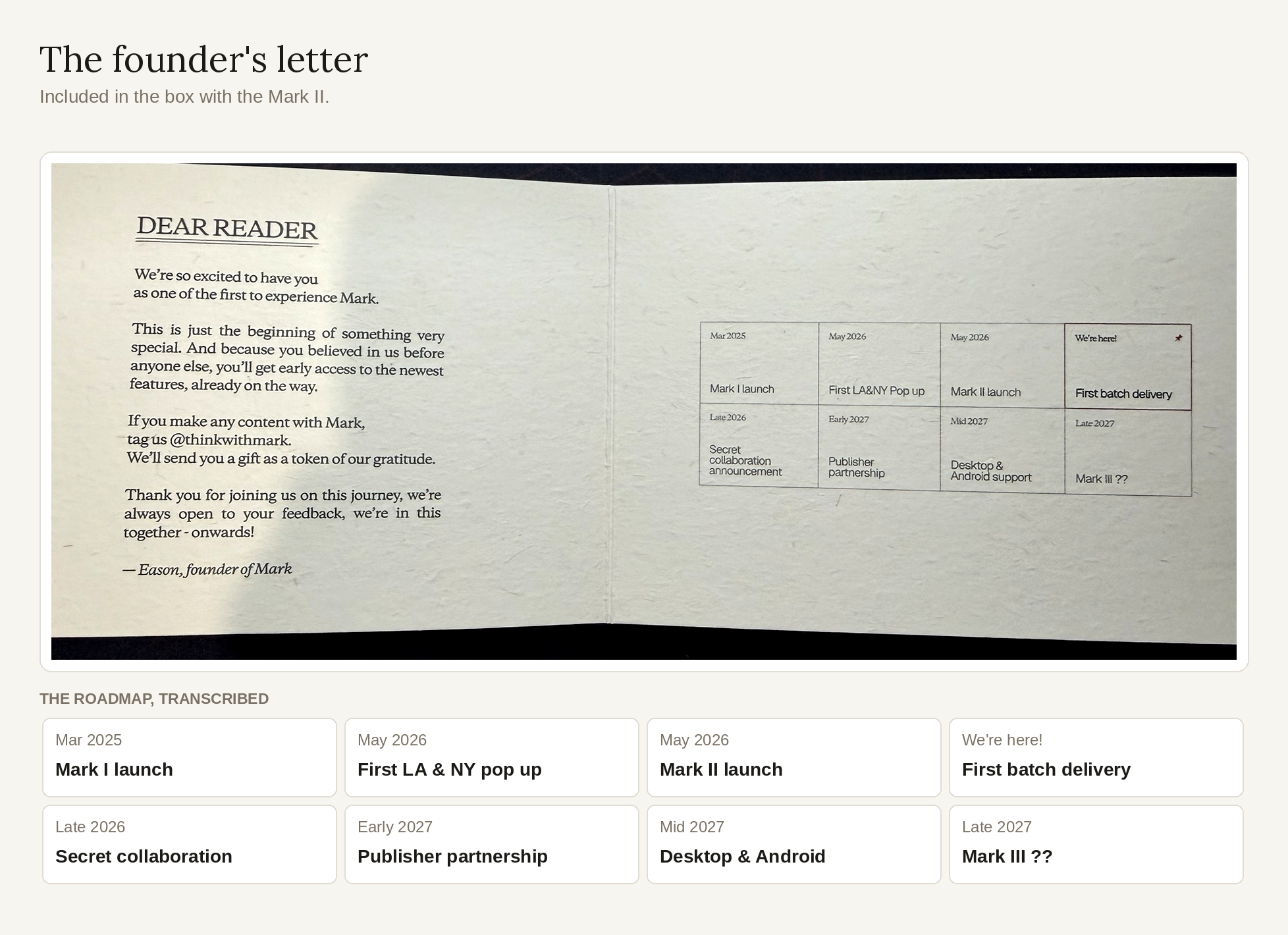
Look at that timeline! Four things come after “We’re here!” (the cell that marks my bookmark arriving): a secret collaboration, a publisher partnership, desktop and Android support, and “Mark III ??”
Only one of those four does anything for the people who already own a Mark II. There is no cell on this timeline for fixing the thing they just sold me — but there is one announcing its replacement, to the people who only just received it. That is just wild to the point of being funny.
There’s a rhythm to it, too. Mark I to Mark II was about 14 months. Mark II to Mark III is estimated at about the same. That’s the clock this company runs on — set by the shiny new thing they want to work on next, not by what they’ve learned from the thing they’ve already sold.
But this is Mark’s approach to pretty much everything. Take sharing and exporting — two ways of getting your quotes out of the app, built to wildly different standards.
Sharing is one tap from the quote itself, and it’s lovely: a nicely designed and typeset card with the book’s info on it, ready to post. Sharing your profile is just as pretty, and even more of a red herring, because the Share Profile button is what most people would assume is the Export button:1
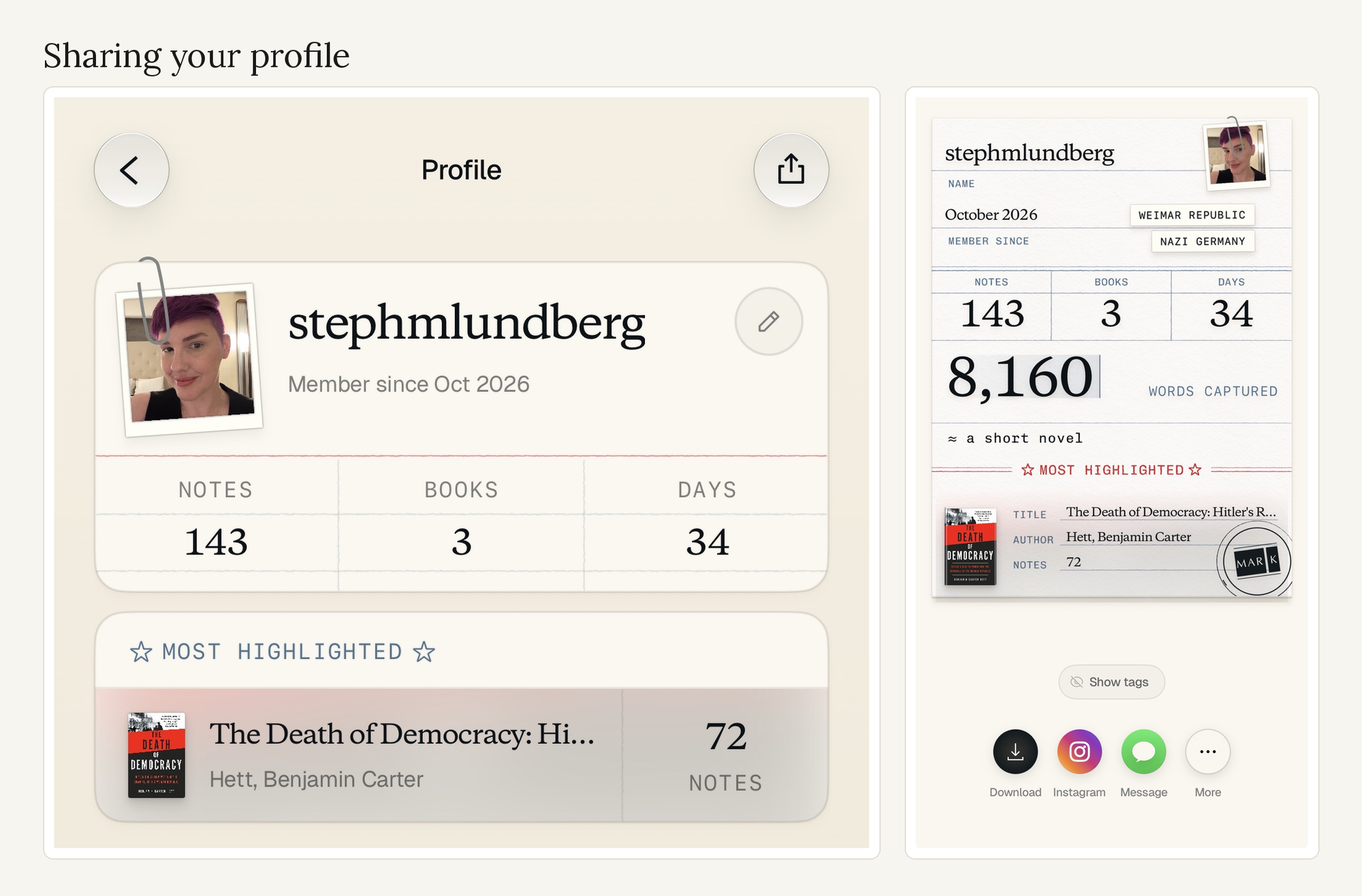
Export lives in your profile, under Data Management, three taps deep, somewhere you’d only find if you already knew to look there. It hands you the basics and silently leaves behind your tags, the titles the app assigned, the note type, and every comment you’ve ever written.
Here’s what Mark says on their own site: “Mark collects what moves you and turns it into something you can actually use.”
But that’s not true. They built the part that shows other people what moved you. They did not build the part that makes it usable to you.
Export is a boring, practical promise! That’s for people who already have a Mark II. Sharing is what looks good — and sharing is what sells more bookmarks. It doesn’t matter if the Mark II’s features match what was promised in the marketing! They’re selling the future, not the present.
Isn’t it beautiful?
Who should buy this
I’m tempted to say no one should buy this just on principle, but that’s not entirely fair.
The Mark II does mostly work. The problem is that the experience of using it is exhausting enough to make me forget that it does. And the company’s general personality chips away at what little confidence I have that they’ll actually address its problems, which makes me not want to rely on the bookmark to do the job I bought it for.
So. Who should buy this?
If you’re right-handed, you’re not on Android, you like the vibes of using what is in reality just experimental hardware (and a lot of people do, including me, so no shade!) and you don’t need it for anything other than to keep track of quotes from books for your own reflection, it would probably be a good fit for you.
But if you need the Mark II to do a job, if you need substance over vibes? I’d pass on it.
- I did the systematic screens test after the voice notes issue; hence the 143 notes instead of 123. Also, I created my Mark account in October, which is when the app starts counting the days I’ve been a user.
Read it here, or have it turn up.
Here on the site, in your inbox, or by RSS. Same issues, no wall, no schedule.
Comments
Something off in this thread? Send me a note and say which post it's on.
More from Deep Dives
All of it is free.
None of it is free to make.
No sponsors, no ads, no paid placements, no affiliate links. It runs on a day job and on whoever feels like chipping in.
Read who pays for thisSupport if you can, don't worry about it if you can't. Support Human is for you either way.
Before you post
Disagree with me all you like — that's half the point. Don't come after other readers, don't post anyone's private details, don't pitch anything, and don't post anything you didn't write yourself. I delete what breaks that and I don't argue about it. Full version →